
When someone pays in cash at the door, record it straight away — it shows on the person and in the month’s numbers.
Open the session from the Calendar, or its door screen from Check-in.
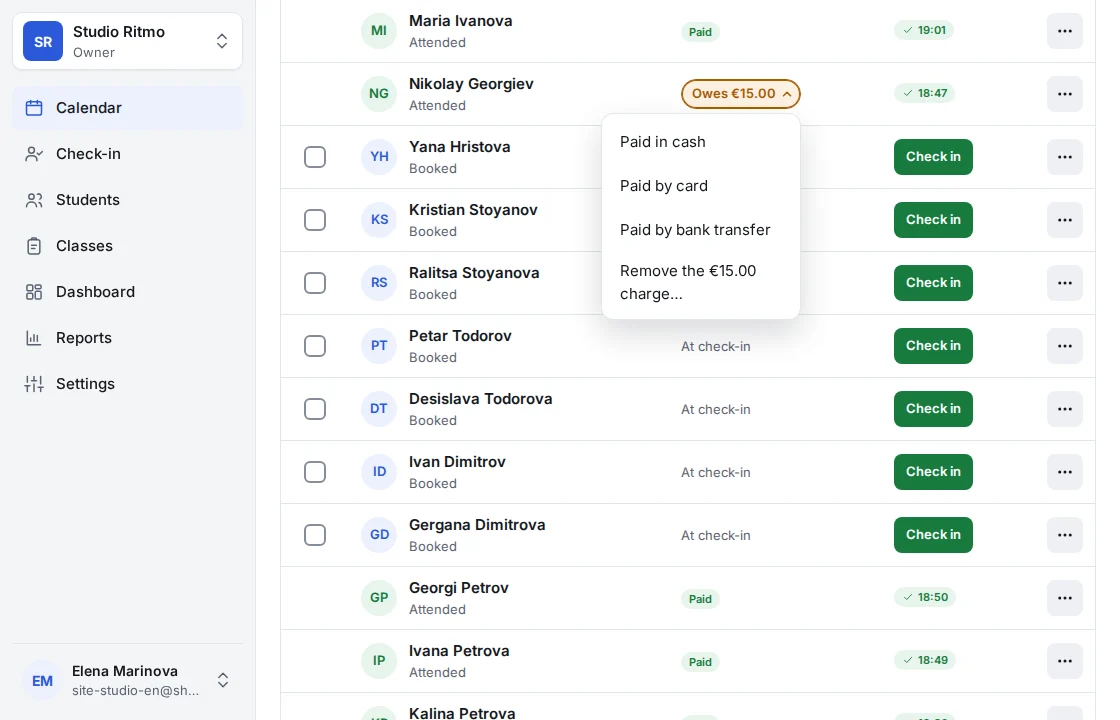
Find the person. Someone who owes shows a badge: Owes, followed by the amount.
Tap the badge and choose Paid in cash.
That’s it — the payment shows on the person straight away. Tapped the wrong one? Undo in the message takes it back.
For an event that takes payment up front, the booking form asks how they paid: pick Cash there and it’s recorded with the booking.
Card and bank transfer are recorded the same way, with Paid by card and Paid by bank transfer. Payments are always recorded on a session, so a client’s page lists them but doesn’t take them.
Shonly’s own words are used here. Your business may have renamed them — a class, a member, a coach — and the steps stay the same.
Related
Still stuck?
Email us — we answer in English and Bulgarian.